 Rebel Tech Alliance
Mobile OS alternatives
Alternatives to: Android, iOS
Google and Apple hoover out a massive amount of metadata from your phone 24/7. Stop feeding into their surveillance business model by switching to a 'De-Googled' Android phone. These are secure and completely private.
Your easiest option is to buy a phone directly from one of the organisations below, with their software preinstalled. However, you can 'flash' these custom OS onto your old phones too. We've made a list of phones that are easy to install (phones not on this list are possible but the process is pretty knarly) further down this page.
If you have an Android phone but you're not yet ready to move to a de-Googled OS, you can use the Universal Android Debloater (UAD). We've listed it in the table here and provide full instructions below.
| App name | Open Source | Structure; Business model | Features | Country of origin | Link |
|---|---|---|---|---|---|
.png) GrapheneOS GrapheneOS |
Yes | Free Open Source | Excellent security; Only works with Google Pixel phones | Canada | GrapheneOS.org |
.png) e/OS/ e/OS/ |
Yes | Nonprofit; Free with paid hardware or flash to your device yourself for free | Available on various brand devices; Based on LineageOS; Parent company Murena has an integrated docs Workspace with email | France | E Foundation |
.png) iode iode |
Yes | Private company; Free with paid hardware or flash to your device yourself for free; Premium tier | Privacy mobile phone OS to replace Android; Based on LineageOS | France | iode.tech |
.png) Lineage Lineage |
Yes | Nonprofit; Free open source product | Privacy mobile phone OS to replace Android | USA | Lineage.org |
.png) Jolla Jolla |
No | Private company; Paid products | Bundles their Sailfish OS with hardware so no need for install; Based on Linux/Android; Company born out of Nokia | Finland | Jolla.com |
.png) PostmarketOS PostmarketOS |
Yes | Non-profit; Free Open Source | Linux-based; Tricky to install but there is a web installer for some phones | Open Source | PostmarketOS.org |
.png) Phosh Phosh |
Yes | Nonprofit; Free open source product | Linux-based mobile phone OS to replace Android | Germany | Phosh.mobi |
.png) PureOS PureOS |
Yes | Private Company; Paid product | Bundled with hardware (Liberty Phone) so no need for install | USA | Puri.sm |
.jpg) CalyxOS CalyxOS |
Yes | Non-profit; Subscription | Bundled with hardware so no need for install | USA | CalyxOS.org |
.png) UAD - Universal Android Debloater UAD - Universal Android Debloater |
Yes | Free Open Source | Allows you to uninstall the bloat and spyware on Android phones; see our instructions below | Open Source | Universal Android Debloater |
RTA's choice
One of us has used GrapheneOS and the other is using e/OS/ and IodéOS.
The Easy list
Here is the list of all the phone models that work with an easy online installer. Your best option is to download our spreadsheet (from here) because you can keep a copy and filter the list, but for quick reference here's a screen grab of it:
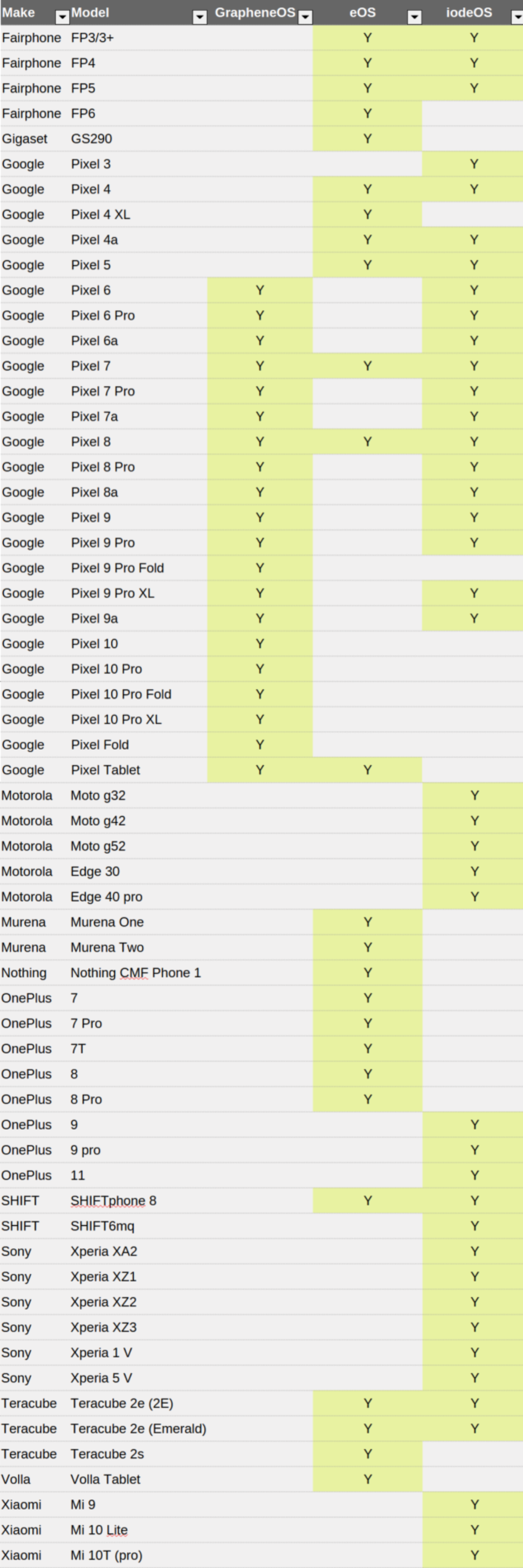
If your phone is not on the easy list, it still might be supported, it's just that you'll have to manually flash it. Each OS website, from the links in the table above, will show if your phone is listed, and the instructions for flashing it. If you cannot find your phone on any of the first three OS sites, then it's quite likely that LineageOS will support it. LineageOS installs are all the hard way, however; there is no easy installer.
PostmarketOS supports the following for their easy web installer: Fairphone 4 and 5, OnePlus 6(T), SHIFT6mq, Xiaomi Mi Note 2.
UAD
Universal Android Debloater - instructions
Conceptual steps
- Download Android Platform Tools to a folder on your laptop. Can be anywhere.
- Samsung - If you're using a Samsung phone make sure you've got Samsung drivers on your laptop
- Download the UAD exe file, and save it into the folder the Platform Tools is in.
- Enable USB Debugging on your phone
- Plug your phone into your laptop
- Double click the UAD exe file
- Start uninstalling stuff
- Unplug your phone
Prerequisites and downloads
- Android Platform Tools SDK - downloaded to your laptop. Get it here
- Drivers for your phone installed on your laptop. For Samsung get them here
- 'USB debugging' enabled on your phone: Settings > About Phone > Software Information > tap 'Build Number' 7 times (this enables Developer Options in Settings) > come back out into main Settings window > Developer Options > USB debugging > toggle ON
The UAD file - install and use - detailed instructions
Download it from here. Click on Releases to the right, then choose for your OS. I used the 'uad-ng-windows.exe' one as I'm on a Windows laptop.
Move the downloaded file to the folder that Android Platform Tools is in. It must be in that same folder. See section above for where to download this.
Then you just double click the UAD exe file. And find stuff on the phone and uninstall them. (if the app is disabled in your phone you have to first enable it, can do this in UAD)
What Patrick uninstalled from a Samsung phone
- Youtube
- Facebook services (anything with Facebook in the name)
- Hot word okgoogle
- Hot word enrollment
- Bard (this is Gemini)
- android.as (android system intelligence)
- android.gm (Gmail)
- Bixby.wakeup
- Bixbyvision
- android.game.gamehome
- rubin (Samsung telemetry app!)
- samsungpass
- android.visionintelligence
- chromecustomisations
- android.scloud (samsung cloud)
- tachyon (google duo)
- Chrome (n.b.┬áis under ÔÇÿadvancedÔÇÖ removals as removing it breaks passkey setup, but no problem if you donÔÇÖt use this, or use your password manager instead)